Skip to content

Security

Your books live on your phone. Not on our servers.

Hesafi keeps your books in the app on your phone or computer, and nowhere else unless you copy a backup.

  1. We can't see your books.
  2. A breach of our servers can't expose them: they aren't there.
  3. A backup opens only with your passphrase or recovery key.
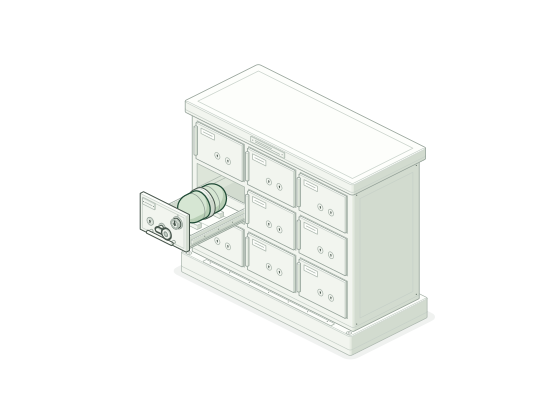
your phone, x-rayedlayer 02/05 · ledger
backup: on

Your books: a database in your browser's private storage on this device. Every entry is sealed to the one before it.

The capsule is a backup you made: a sealed copy you keep off the phone.

caseledgersealappscreen

The border

Four things can cross. Your books don't.

Everything on the left stays on your phone or computer. Each thing on the right leaves only when you do something, and we list every field it carries.

Stays on your device

unless you copy a backup yourself

  • Ledger and invoices
  • Customers and suppliers
  • M-PESA and bank statements
  • Supplier PINs and eTIMS numbers
  • Tax workings
  • Your passphrase and recovery key
  • Backups, until you copy one

Crosses only when you act

  1. Manifest 01

    Licence activation

    When
    Once per device, when you activate. Then about once a day when you're online, with only your licence and device, to keep its place and read your AI credits.
    Sends
    • Your licence key and a random device id the app made
    • A label like "Chrome on Android", so you can tell your devices apart
    • Your country and the Terms version you accepted
    • Meta's ad-click ids, if you came from an ad and didn't object
    Never sends
    Anything from your books.
  2. Manifest 02

    AI help you run

    When
    Only when you press an AI button and accept the credit cost it shows.
    Sends
    • Your licence, to charge the credits
    • For the AI service provider (contracted not to train on it or keep it): the date, description and amount of each line you picked, and your category names
    • A random id for the request: the answer is kept for 24 hours under it, so a dropped connection doesn't cost twice
    Never sends
    The rest of your ledger, your balances or your business name.
  3. Manifest 03

    Payment

    When
    When you buy a licence or AI credits.
    Sends
    • What you're buying, your email and the business name for your receipt, to Paystack
    • Your country, Terms version and device id, kept with the order
    • Your M-PESA number, if you give it, kept only as a hash to measure our ads (not at all if you objected)
    Never sends
    Your M-PESA PIN or card number: you type them on Paystack's page. We only learn whether it was paid.
  4. Manifest 04

    Sign-in (optional)

    When
    Only if you choose to sign in with Google or Facebook.
    Sends
    • The name and email on that account, to link your licence, so a new phone gets it back without the key
    Never sends
    Your books.

    No request of ours to show: Google or Facebook handle the sign-in page.

This website, not the app, measures our ads with Meta, as our Privacy notice explains.

Backups

Two keys open your backup. We have neither.

Backups are free forever, on every plan.

Make one in a minute

  1. Choose a passphraseA few words only you would think of.
  2. Save your recovery key32 letters. If you forget the passphrase, it also opens your backups.
  3. Save a copy off this phoneSend it to yourself on WhatsApp or upload it to Google Drive.
Lock
AES-256-GCM
PBKDF2 rounds
600,000
Recovery key
160-bit
Protect your books in the app
A bank of safe-deposit boxes with one drawer slid out on its runners, holding a sealed capsule behind a lock with two keyways and a small dial.

Verify books

Change one entry and the chain shows it.

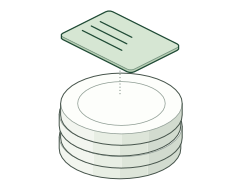
Every saved entry is sealed together with the one before it. If anything is edited, deleted or reordered behind the app's back, Verify books shows where. Real mistakes are fixed with a reversal, so both entries stay on record.

Verify books: all 5 entries check out.Verify books: entry 03 doesn't match its seal. It was changed after it was saved.

the chain5 entries
  1. 01Opening cashseal 30c53539…1 OctKES 5,000
  2. 02M-PESA salesseal 643bfd0d…2 OctKES 2,350
  3. 03Stock from supplierseal 88562a04…3 OctKES 1,8001,800 KES 18,000
  4. 04KPLC tokensseal 0e89256a…not checked: the chain broke above4 OctKES 500
  5. 05Cash salesseal b034c61e…not checked: the chain broke above5 OctKES 1,200
06Reversal of 03How a real mistake is fixed: both entries stay on record.−KES 1,800
all sealed

Sample entries. The seals are real SHA-256, made by the same code the app uses.

The trade-off

We never hold your books, so we can't bring them back.

If you lose your phone, clear your browser's data, or forget both your passphrase and your recovery key, the books on that device are gone. We can't see them, so we can't restore them.

Three habits

  1. Back up every week.The app reminds you after 7 days.
  2. Keep a copy off the phone.WhatsApp to yourself, Google Drive or a flash disk.
  3. Write the recovery key on paper.Keep it somewhere your phone isn't.

On iPhone, add Hesafi to your home screen. Safari can clear a website's data after 7 days without use.

Under the hood

For your accountant, or anyone who likes the details.

Privacy noticeTerms

WhatHow
Where the books liveA SQLite database in your browser's private file storage (OPFS) on this device. One tab writes at a time.
BackupsA .hesafi file encrypted with AES-256-GCM. Its key is wrapped twice: by your passphrase (PBKDF2-SHA256, 600,000 rounds) and by a 160-bit recovery key. The header is authenticated, so tampering is detected.
EntriesEach entry is sealed with SHA-256 together with the previous entry's seal. Saved entries can't be edited or deleted, only reversed. Past periods can be locked.
LicenceSigned by us with Ed25519 and checked on your device every time Hesafi opens, so it works offline.
AIOnly the lines you pick, sent through our server to an AI service provider that may not train on them or keep them. Our server's request logging is off.
What our servers keepLicences and their devices, AI credit balances, hashed emails, payment references, and the Terms version you accepted.
PaymentsM-PESA and cards through Paystack. We never see your M-PESA PIN or card number.
Statements you importRead on your device and never uploaded. Files are size-checked before they're opened.
This websiteMeasures our ads with Meta, as the Privacy notice explains. The app's pages have no ad pixel.

Start free today. Pay once when you're ready.

Invoices and basic books are free forever. No card needed. Questions? Message us on WhatsApp.